Agent UX: Building developer tools for humans and their coding agents
For a long time, visual SaaS apps have been the go-to solution for professional tooling. You sign up, invite your team, click around a nicely designed dashboard and get your work done. But with coding agents, this is changing. More and more of the actual work now happens in the terminal, driven by an assistant like Claude Code that reads your files, runs commands and writes code for you. And if your tool doesn’t let the agent operate it, it’s suddenly on the wrong side of how people work.
I’ve always been passionate about user and developer experience, and I’ve written about it quite a lot over the years. My own developer journey started with web development, which I still love, before I moved on to Python, machine learning and building developer tools for NLP.
In this post, I want to share some thoughts on what you could also call agent UX for developer tools, and the solutions we came up with while building Ellf, our new platform for agentic NLP development. Ellf is both a web app and a developer tool, so we had to figure out how to make it work for humans and agents – ideally at the same time.
Software that builds software
In his PyData London keynote this year, Jeremiah Lowin of Prefect talked about building developer tools, and this quote, which I paraphrased in a recent talk, stuck with me:
We used to build software for people to build software. Now we build software so software can build software.
Maybe this sounds a bit dramatic, but it’s pretty accurate. Developer tools have always had two kinds of users: people who prefer to work visually in an app, and developers who want to script everything. Now there’s a third one, and it’s quickly becoming the one that does most of the work.
At Explosion, we’ve spent the last ten years building tools like spaCy and Prodigy. They’re pretty powerful, but the question has always been how to make it easy for people to actually use that power. And use all the other powerful tools and models that are coming out to their full potential. Good docs and well-designed APIs only get you so far. Knowing which workflow to choose and how to break down a problem ultimately takes experience, and that’s hard to communicate through an app or a UI.
If you’ve been following us for a while, you might know that we started working on bringing our ideas to the cloud a long time ago. We ran out of time just before getting it done for Prodigy, but we were able to pick things back up as Ellf. This also happened to coincide with the rise of coding assistants, which turned out to address one of the biggest bottlenecks we never had a good answer for: how to guide people towards the most efficient workflows. So we started looking at what’s currently missing to make coding assistants like Claude Code good at solving NLP problems and working on data-centric projects. (If you want the product version of the answer, see our blog post.)
Apps, APIs and agents need to speak the same language
As we worked on this, it became clear that the most important part was enabling collaboration between humans and coding agents. If a human and an agent are going to work on a project together, they need a shared surface. The things you can see and do in the app, the things you can do via the API and the things the agent can do should all be the same things, called the same way.
People sometimes talk about human-machine hybrids as centaur systems: a head and brain (human), powered by the strong body of a horse (machine). At least, we typically imagine that we are the head. The flip side is what Cory Doctorow calls the reverse centaur: a horse’s head with a human body and butt, or a human who ends up serving the machine, going off to click some buttons and reporting back to the agent.
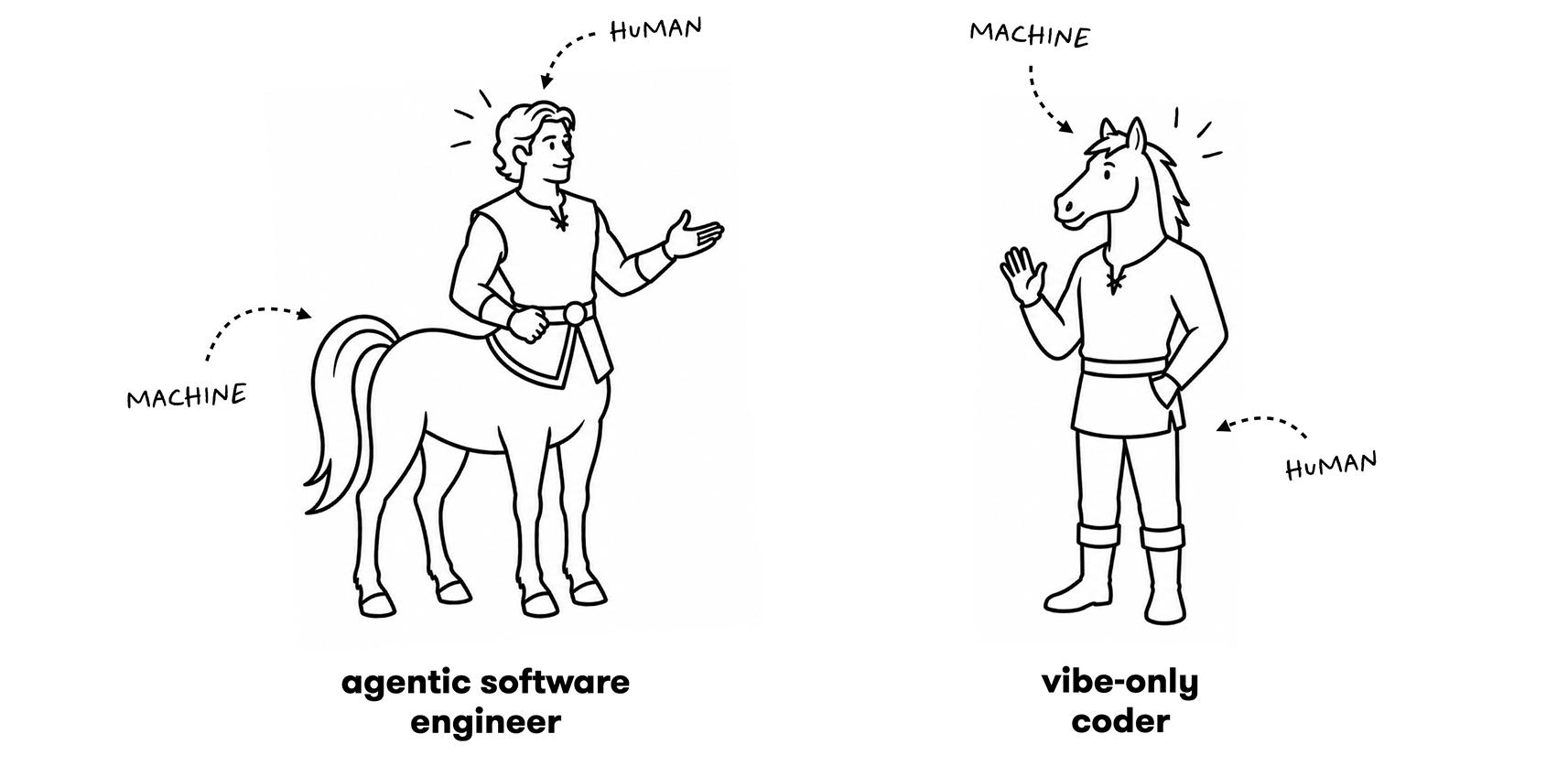
I think a lot of tools today accidentally turn their users into reverse centaurs. If the only real way to get something done is through a GUI, the agent can’t do it, so it plans around it. At that point, you’re not the one directing the work anymore – you’re just an execution step in the agent’s plan. If you want the centaur version, the agent needs to be able to do everything the human can, and vice versa. That’s only possible if both of them are operating the same system through interfaces that map onto each other.
One function, two interfaces
The clearest example of this in Ellf is how custom workflows work. Generating CLIs for custom functions is something we’d been doing in Prodigy for a long time. But since Ellf also includes a web app, we wanted to take this one step further and also generate a matching UI.
Python provides great building blocks for this: decorators let you attach metadata to functions, and type hints can define the expected input and output types, including fully custom objects and dataclasses. If an argument is typed str, it will become a text input. If it’s typed Dataset, it will become a selection field for all datasets on your cluster. And if it’s typed Input[Literal["text"]], the selection field will include all input assets that are text.
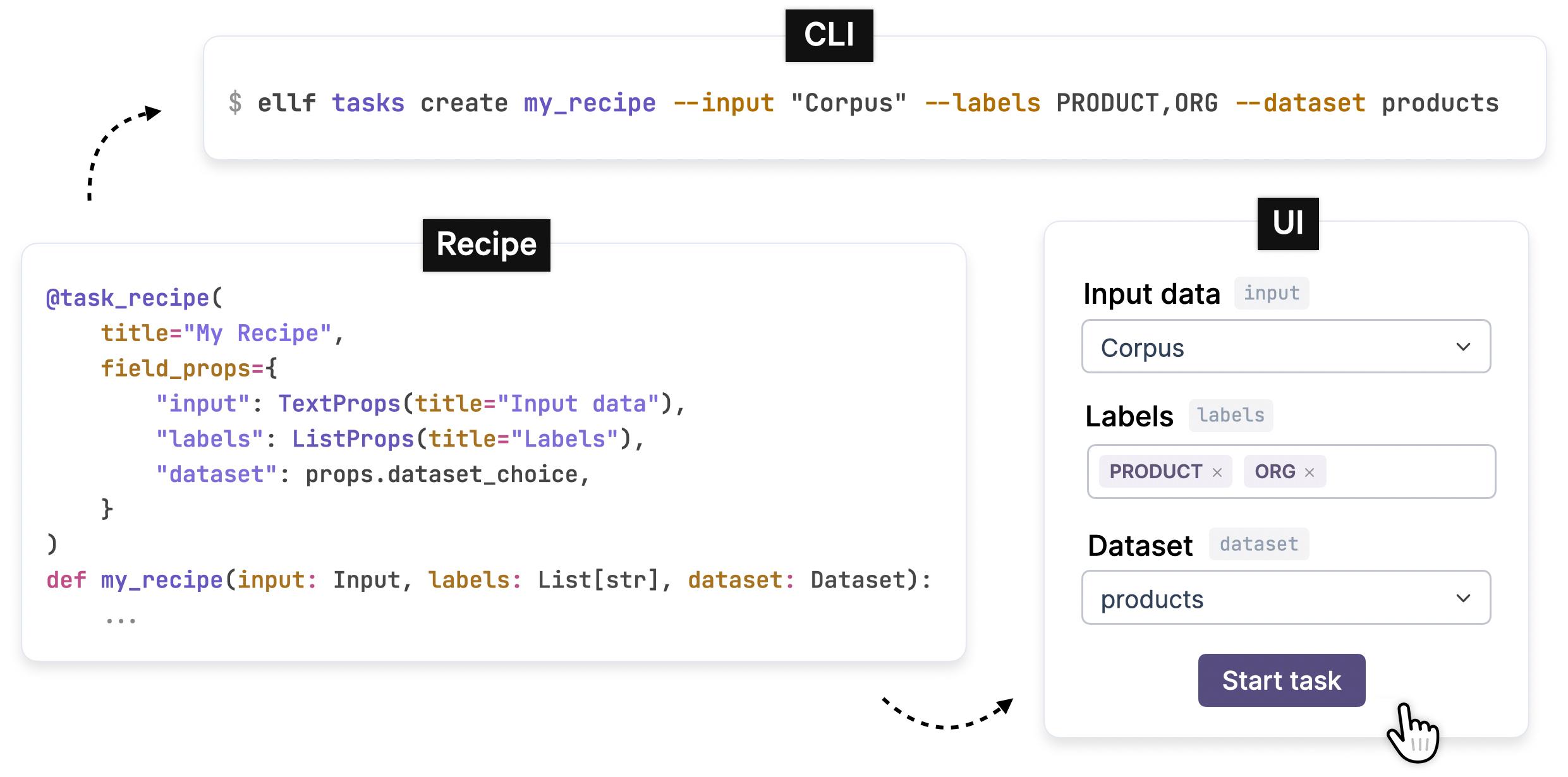
Non-developers and team members who prefer configuring things visually can use the form to set up jobs like annotation tasks or training runs. Developers and coding agents can use the CLI to do the same programmatically and more efficiently. Neither is a second-class citizen, because both are generated from the same source.
This feels especially magical when your coding agent is the one writing the function. If you need a custom script to preprocess some data, it will write it, define the arguments and upload it to your cluster – and within minutes, it shows up in the app with a custom form, ready to be configured and run by anyone on your team. The agent built a tool, and the human can use it without ever opening a terminal.
Scripting the SaaS app
Software-as-a-service products are great and convenient because they give you a central hosted app with user accounts and make it easy to collaborate. But because they’re not running on your servers, you typically can’t configure them with code (unless you go fully on-premise, which introduces a whole other maintenance burden).
One of the most frustrating things when using a tool or platform is hitting a missing feature you need and not being able to unblock yourself, so you have to message support, wait for a reply and hope that they’ll be able to implement what you need. If the framework is fully scriptable however, you will always be able to unblock yourself and keep working.
Under the hood, Ellf solves this by letting you plug in your own data processing cluster that runs your code, locally or in the cloud. It works a bit like self-hosted runners in a CI system: the app gives you the shared interface, user accounts and collaboration features, and your cluster does the actual work and keeps your data private. Your custom workflow functions produce an interchange schema that the platform uses to generate the UI forms and CLIs.
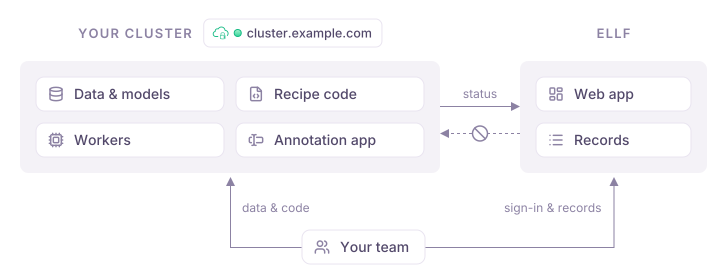
In our tools, we’ve always liked moving as much as possible into the user space and making built-in workflows work just like custom ones. Ellf ships with many different recipes for common workflows like annotation or training, but the framework is fully general. Whatever you need to do, if you can do it in Python, your coding agent will be able to build it, and it has a platform to configure and run it.
We always knew we wanted this kind of architecture because it has so many advantages, like full data privacy and scriptability. But running your own infrastructure means that you need to, well, actually run that infrastructure, and for many teams, that simply wasn’t viable. Coding assistants changed this, too. Setting up and debugging a cluster used to require a lot of DevOps experience. Now it’s the kind of task an agent can walk you through, which means the architecture is finally practical for a lot more teams and even solo developers.
Every page has a command
Coding agents are great at using CLIs out of the box, especially if they’re well designed and consistent. CLIs are text-in, text-out, they’re easy to discover via --help and they compose with everything else in the terminal. So in Ellf, the agent always uses the CLI to perform actions, and we designed it carefully (by humans!) to map pretty much 1:1 to the functionality of the web app.
For each page you’re on, the app’s command bar can show you the corresponding CLI command. You can explore something visually, then copy the command and continue in your terminal. Or you can ask your agent to do something, and then go and look at the result in the app, which shows you the same thing.

I believe this tight coupling is especially important for developer tools, and even more important now that coding agents can operate developer tools for you. (In my PyCon India keynote back in 2019, I argued that developer tools need good programmable interfaces instead of more leaky abstractions. That turned out to be true in a way I didn’t even expect back then: the most enthusiastic users of programmable interfaces are now agents.)
Scheduling work on the human
When we opened the beta waitlist for Ellf, we included a short questionnaire about people’s AI workflows, since we always love learning more about what’s working and what isn’t. There’s of course a selection effect at play here, but almost 50% of respondents named evaluating and improving LLM output quality as their biggest bottleneck in building custom AI and NLP applications today, followed by a lack of labelled data and the time and cost of scaling annotation.
We all know that we should spend more time with our data, but I think a big problem is that teams don’t have a low-friction way to get this done. So even for use cases that have clearly defined inputs and outputs, they often go with a vibes-based evaluation instead of a data-centric one.
One thing we always felt was missing from coding assistants was a way to get feedback from humans on real data. You can think of it as letting the agent schedule some work on a human. It’s just another device you have available, and you want to use it where it matters the most. The human is still steering the project – the agent just knows when it’s time to ask for input, and has the tools to make that input quick and focused.
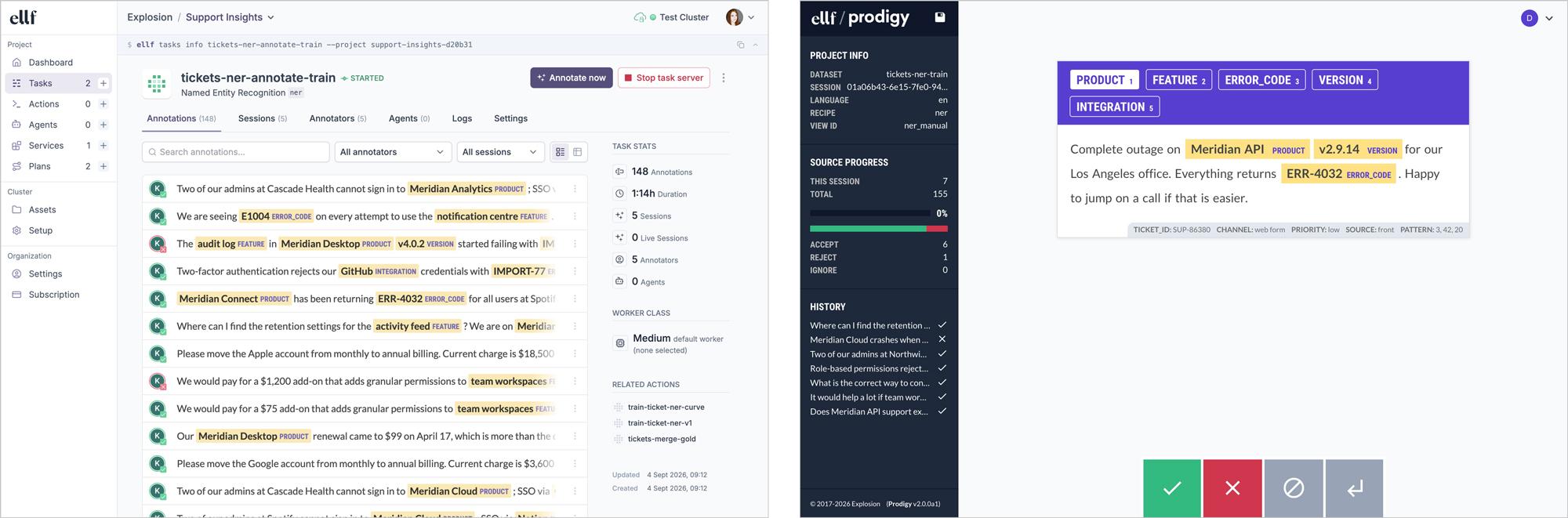
If the coding agent knows that it has tools for annotation available and doesn’t need to build them from scratch, it’s much more likely to bring the human into the process. We’re not even talking “big data” here – a few hundred examples here and there can already make a massive difference. So if you have an LLM-based system and want to make sure it actually works, the agent can set up an evaluation, use LLMs for the grunt work like pre-annotating examples, and leave the decisions that require judgement to you. And if you know where your system falls short, you also know where to start improving it.
Making the tool good at using itself
The last piece of the puzzle is knowledge. Over the years, we’ve written extensively about strategies and best practices for building robust NLP systems and developing data, and helped teams solve all kinds of problems across many different use cases and industries. Sure, you can read our blog posts, and we hope they’re useful, but applying best practices to your project still takes time and experience.
Coding assistant skills and MCP servers finally gave us a good way to provide this knowledge so that others can adapt it to their specific use case. This is especially helpful for the first steps of every NLP project: deciding how to break down the problem, how to define what you want the output to be and which technologies and approaches to use. The strategy you choose here will be highly specific to your use case, and it may change as you iterate. That’s exactly the kind of conversation that’s hard to have with a UI, and pretty natural to have with an agent.
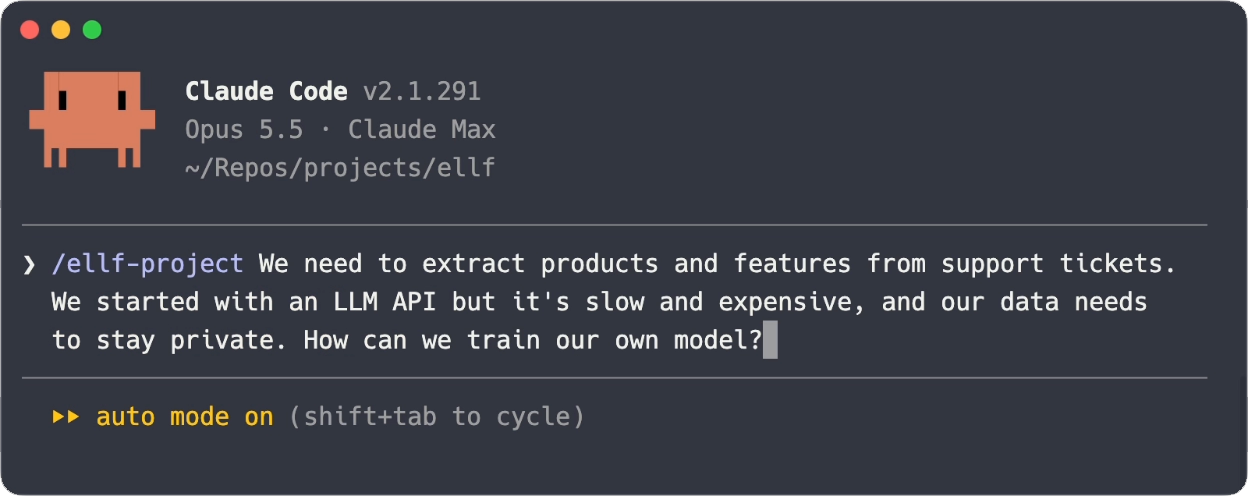
(The plan that comes out of that conversation is written to a Markdown file that’s synced to the platform, so it’s another shared surface: the agent keeps it up to date as the project progresses, and your team can read it locally or in the app.)
Building Ellf and working closely with coding agents gave me a lot of inspiration for what’s possible for developer tools. A visual app on its own isn’t enough anymore, and neither is a well-documented API that only humans know how to use. I think the tools that will work best in the long run are the ones where apps, APIs and agents speak the same language, and where the human stays in the loop as the one steering.
If you want to try it out for yourself, you can sign up for free, connect Ellf to your coding assistant and start building. I hope you’ll find it useful – let me know how you go!
Ellf